Saturday, 5 November 2016

What is difference between $*, $@ , $_and $0?

Q.46 . What is difference between $*, $@ , $_and $0?

$#
The number of arguments supplied to a script.
$*
All the arguments are double quoted. If a script receives two arguments, $* is equivalent to $1 $2. 
The "$*" special parameter takes the entire list as one argument with spaces between
$@
All the arguments are individually double quoted. If a script receives two arguments, $@ is equivalent to $1 $2.
The "$@" special parameter takes the entire list and separates it into separate arguments.
$?
The exit status of the last command executed.
$0
Gives File Name


test.sh
#!/bin/sh
 
echo "File Name: $0"
echo "First Parameter : $1"
echo "Second Parameter : $2"
echo "Quoted Values: $@"
echo "Quoted Values: $*"
echo "Total Number of Parameters : $#"
Here is a sample run for the above script −

$./test.sh Foo Bar
File Name : ./test.sh
First Parameter : Foo
Second Parameter : Bar
Quoted Values: Foo Bar
Total Number of Parameters : 2


$echo $?
0
 

Tuesday, 18 October 2016

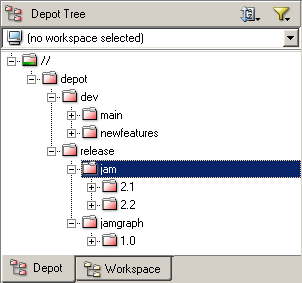
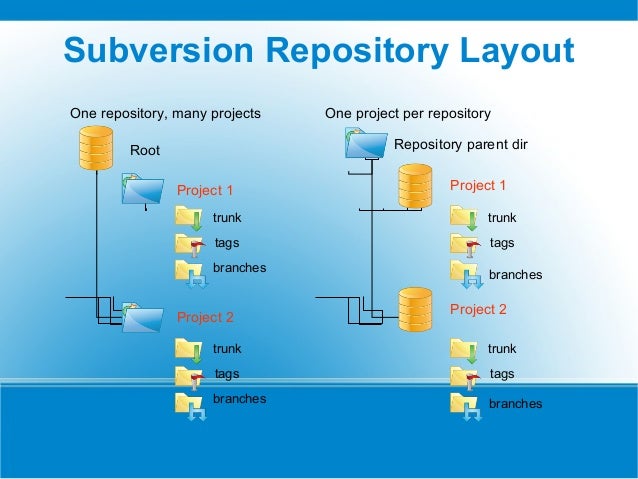
What is the structure of branches in the repo?

SVN
Image result for svn tree structure

Perforce
Image result for perforce tree structure


How to create a branch in SVN?

HTTPS

If you're repo is available via https, you can use this command to branch ...
svn copy https://host.example.com/repos/project/trunk \
       https://host.example.com/repos/project/branches/branch-name \
  -m "Creating a branch of project"

SVN+SSH

Subversion makes it easy (some think too easy) to create a new branch using the svn copy command.
$ svn copy svn+ssh://host.example.com/repos/project/trunk \
           svn+ssh://host.example.com/repos/project/branches/NAME_OF_BRANCH \
      -m "Creating a branch of project"

Sunday, 20 October 2013

Important SVN Commands

SVN Commands


SVN Commit – Commit/Chekins changes into Repo

Syntax:
$ svn commit -m "Enter Log messages"

SVN Diff – To See Difference in files

Syntax:
$ svn diff filename

SVN Status – Status of the working copy

Syntax:
$ svn status PATH

SVN add — Add files, directories, or symbolic links

Syntax:
$ svn add path

SVN copy (cp) — Copy a file or directory in a working copy or in the repository.

Syntax:
$ svn copy foo.txt bar.txt

SVN mkdir — Create a new directory under version control.

Syntax:
$ svn mkdir URL

Sample example for Nant Build file

Sample Example


 <?xml version="1.0"?>
    <project name="Hello World" default="build" basedir=".">
        <description>The Hello World of build files.</description>
        <property name="debug" value="true" overwrite="false" />
        <target name="clean" description="remove all generated files">
            <delete file="HelloWorld.exe" failonerror="false" />
            <delete file="HelloWorld.pdb" failonerror="false" />
        </target>
        <target name="build" description="compiles the source code">
            <csc target="exe" output="HelloWorld.exe" debug="${debug}">
                <sources>
                    <includes name="HelloWorld.cs" />
                </sources>
            </csc>
        </target>
    </project>


Sample example for Ant Build file

Sample Example


<project name="MyProject" default="dist" basedir=".">
    <description>
        simple example build file
    </description>
  <!-- set global properties for this build -->
  <property name="src" location="src"/>
  <property name="build" location="build"/>
  <property name="dist"  location="dist"/>

  <target name="init">
    <!-- Create the time stamp -->
    <tstamp/>
    <!-- Create the build directory structure used by compile -->
    <mkdir dir="${build}"/>
  </target>

  <target name="compile" depends="init"
        description="compile the source " >
    <!-- Compile the java code from ${src} into ${build} -->
    <javac srcdir="${src}" destdir="${build}"/>
  </target>

  <target name="dist" depends="compile"
        description="generate the distribution" >
    <!-- Create the distribution directory -->
    <mkdir dir="${dist}/lib"/>

    <!-- Put everything in ${build} into the MyProject-${DSTAMP}.jar file -->
    <jar jarfile="${dist}/lib/MyProject-${DSTAMP}.jar" basedir="${build}"/>
  </target>

  <target name="clean"
        description="clean up" >
    <!-- Delete the ${build} and ${dist} directory trees -->
    <delete dir="${build}"/>
    <delete dir="${dist}"/>
  </target>
</project>
Tricks and Tips